Posts Tagged ‘tracks’


get your brain subscribed to

Wednesday, February 8th, 2006

In the ‘subscribe to my brain’ post I promised to blog on how-to get your own

button up and running on your homepage. It seems rather unlikely that I’ll ever keep that promise if I don’t do it right away. So, here we go for a quick tour :

step 1 : set up a rudimentary FoaF-file : read the FoaF post if you dont know what it’s all about. The easiest way to get a simple FoaF-file of your own is to go to the FoaF-a-matic webpage and fill in the details you feel like broadcasting over the web, crucial is your name and email information (for later use) but clearly the more details you fill out and the more Friends you add the more useful your file becomes. Click on the ‘foaf-me’ button and copy the content created. Observe that there is no sign of my email adress, it is encrypted in the mboxsha1sum data. Give this file a name like foaf.rdf or myname.rdf and put it on your webserver to make it accessible. Also copy your mboxsha1sum info for later smushing.

step 2 : subscribe to online services and modify your online-life accordingly : probably you have already a few of these accounts, but if not, take a free subscription just for fun and (hopefully) later usage to the following sites :

  • del.icio.us a social bookmarks manager
  • citeUlike a service to organise your academic papers
  • connotea a reference management service for scientists
  • bloglines a web-based personal news aggregator
  • 43things a ‘What do you want to do with your life?’ service
  • audioscrobbler a database that tracks listening habits and does wonderful things with statistics
  • backpackit a ‘be better organized’ service
  • flickr an online photo management and sharing application
  • technorati a Google-for-weblogs
  • upcoming a social event calendar
  • webjay a playlist community

So far, I’m addicted to del.icio.us and use citeUlike but hardly any of the others (but I may come back to this later). The great thing about these services is that you get more value-information back if you feed more into the system. For example, if you use del.icio.us as your ‘public’ bookmarks-file you get to know how many other people have bookmarked the same site and you can access their full bookmarks which often is a far more sensible way to get at the information you are after than mindless Googling. So, whereas I was at first a bit opposed to the exhibisionist-character of these services (after all, anyone with web-access can have a look at ‘your’ info), I’ve learned that the ‘social’ feature of these services can be beneficial to get the right information I want. Hence, the hardest part is not to get an account with these services but to adopt your surfing behavior in such a way that you maximize this added value. And, as I mentioned before, I’m doing badly myself but hope that things will improve…

step 3 : turn these accounts into an OPML file : Knowing the URL of your foaf-file and sha1-info (step 1) and your online accounts, go to the FOAF Online Account Description Generator and feed it with your data. You will then get another foaf-file back (save the source in a file such as accounts.rdf and put it on your webserver). Read the Lost Boy’s posts Subscribe to my brain and foaf: OnlineAccount Generator for more background info. Then, use the SubscribeToMyBrain- form to get an OPML-file out of the account.rdf file and your sha1. Save the source as mybrain.opml.

step 4 : add/delete information you want : The above method uses generic schemes to deduce relevant RSS-data from an account name, which works for some services, but doesn’t for all. So, if you happen to know the URL of RSS-feeds for one of these services, you can always add it manually to the OPML-file (or delete data you don’t want to publish…). My own attitude is to make all public web-data available and to leave it to the subscriber to unsubscribe those parts of my brain (s)he is not interested in. I know there are people whoo are mainly interested to find out whether I put another paper online, would tolerate some weblog-posts but have no interest in my musical tast, whereas there are others who would like me to post more on 43things, flickr or upcoming and don’t give a damn about my mathematics… Apart from these online subscriptions, it is also a good idea to include additional RSS-feeds you produce, such as those of your weblog or use my Perl script to have your own arXiv-feeds.

step 5 : make your ‘subscribe to my brain’-button : Now, put the OPML-file on your webserver, put the button

on your homepage and link it to the file. Also, add information on your site, similar to the one I gave in my own subscription post so that your readers know what to do when do want to subscribe to (parts of) your brain. Finally, (and optionally though I’d wellcome it) send me an email with your URL so that I can subscribe (next time you’re in Antwerp I’ll buy you a beer) and for the first few who do so and are working in noncommutative geometry and/or noncommutative algebra, I’ll send a copy of a neverending book. Mind you, this doesn’t apply to local people, I’m already subscribed to their brain on a daily basis…

tiger tracks

Monday, June 13th, 2005

I got Tracks working under Tiger by trial and error starting with a suggestion from Jan who found a fix here. From this I stumbled on for an hour or so on my iMac untill near the very end I found that the tracks-page itself now has a Tiger-section. So, let’s try to do it all over again from fresh on my regular machine (a little iBook).

Start with this page and read it all the way to the comments. There is a comment by Jamie on installing Rails and MySQL on a fresh Tiger which looks like the thing I want followed immediately by another post by Jose Marinez on Installing Ruby on Rails on Tiger which I decided to follow by the letter (with one noticeable exception!). So first I downloaded the Rails installer on Tiger. Next, an install of the Standard version of MySQL. I used version 4.0 for OS X 10.3 !!!! NOT 4.1 !!!!. I installed MySQL and the StartUpItem. Next, I opened Terminal and typed the following commands

- cd /usr/local/mysql
- sudo chown -R mysql data/
- sudo echo
- sudo ./bin/mysqldsafe &

and verified it by performing a simple test

/usr/local/mysql/bin/mysql test

Next, I secured everything by having a root-password

/usr/local/mysql/bin/mysqladmin -u root password *

Then I remembered that I’d better not have to type the whole path so I did a

echo ‘export PATH=/usr/local/mysql/bin:$PATH’ >> ~/.bashprofile

Also, I want to admin MySQL via phpmyadmin so I installed it. Then I enabled my webserver to use PHP using this post though I did use vi rather than pico! Next, i did a check whether everything worked fine by typing in safari

http://localhost/~lieven/phpmyadmin/index.php

Followed by a

sudo gem install mysql – –with-mysql-dir=/usr/local/mysql

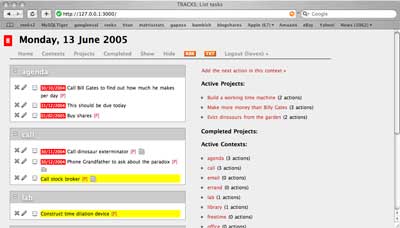
Now, it is time to get the Tracks-package and to follow these instructions And, it works! Here is the proof :
balm or poison

Monday, May 9th, 2005

Don’t try to follow the previous post unless you want to end up in a neverending (sic!) series of re-installs, unrecognized harddisks at start-up and a few kernel-panics!

At this moment I know of NO safe way to use Carbon Copy Cloner to make a bootable clone of my HD. Here is the only way I managed to make a bootable copy :

- before you start, click on the target-partition of the external HD and use File/Get Info and uncheck under Ownership & Permissions the box Ignore ownership on this volume
- this might be enough for you but I had to use DiskUtility to Erase the externet HD-partition.
- then follow the previous post (that is do sudo open on CCC and then proceed as usual BUT make sure in your prefernces only the box Make Bootable is checked and certainly no syncing-options!)

A bit too drastic for me. Its a bit like : make a DMG of your MacintoshHD and do a restore on an empty external partition. It seems that Tiger and Panther have very different DNA-samples bringing a lot of excellent free- and shareware developers near a nervous breakdown. Have the Apple-people ever heard of something like backwards compatibility? Anyway, I’m not going to try making another backup again until Mike Bombich has released a Tiger-version of CCC!

Also, don’t try to follow the suggestions of my Tracks post. It certainly is not enough to get tracks running under Tiger (and probably also not under Panther as at the time I did a strange mix of following this path and doing some manual installs using the Hivelogic page. This time, I got strange errors coming from the Ruby-MySQL dialogue. I’m not going to try installing MySQL, PHP and Tracks before someone like Marc Lyanage tells that it is safe to use the Panther-packages under Tiger!

So, for the moment I’m just going to use my minimal system (Tiger+Xcode Tools+TeX (following the instructions from this page )+some excellent free and shareware like DevonThink , Pod2Go , VoodooPad , SubEthaEdit , QuickSilver , Transmit and NetNewsWire ) until the experts have tamed Tiger. Meanwhile, I’ll just confine myself to the Dashboard-Kintergarten !

tiger days 1

Sunday, May 8th, 2005

It should be really day 2 but yesterday evening I was a bit overoptimistic and tried to get MySQL, Ruby, Rails & Tracks installed and in the process totally wrecked my Ruby-system (and probably a few things more). Besides, I found out that the Carbon Copy Cloner work-around doesn\’t really work (that is, one canNOT boot from the cloned copy) etc. etc. In short, a lot of frustration. So today, I started all over again (using the install notes below to guide me and so I could reduce the total time to about 2 hrs). But, as this was the easy bit (still to come : MySQL, PHP, WordPress+LatexRender, Ruby&Tracks etc.) and I don\’t want to redo everything again when I do something horribly wrong I changed my overall tactics. I\’ll keep identical copies on my iBook and on my iMac and do the next batch of installs on just one machine and check whether everything works before syncing it to the other. If something gets messed up I resync to the state of the previous day. Just one question left : what program to use for the backup/restore now that CCC seems to be broken? Fortunately, there is still PsyncX which still seems to work fine (at least today…). Below, for what it is worth, yesterday\’s log of events :

Okay, I checked that I can still TeX papers and connect to the printer on the iMac (after Archive/Install to Tiger). Most other things have broken down, such as my mind on tracks and my MySQL-database, but I\’m quite hopeful I can rebuild them all. So, time for a drastic Erase/Install on my iBook.

12:04 : One final safety check. Connect the external HD, select the Carbon Copy Cloned partition as StartUp Disk and do a Restart to verify that it can be cloned back should everything go terribly wrong. Seems to work nicely, so change again from StartUp disk, restart and disconnect the external HD.

12:16 : Printed the macdevcenter install tips and made a fresh pot of coffee. Took the unread part of the newspaper with me, connected Jan\’s iPod, made it the new StartUp disk and did another Restart.

12:24 : Selected \’English\’ as the main language. Selected DiskUtility from the Utilities menu (before you have to select a Disk destination). Selected the HD, clicked Erase and choose Erase Free Space first, then choose the SecurityOption to \’zero out data\’. (Both steps require a lot of extra time but what is the point of doing an Erase if you don\’t erase properly? Btw. the macdev-article does not agree with me on this point.) Meanwhile, had some coffee and a read…

13:23 : Did quit DiskUtility which brought me back to the Installer. Selected the HD and clicked on Options to select Erase&Install and clicked Continue. Then clicked on Custom Install to choose which Packages to Install. Did choose all Printer Drivers but in Language Translations only selected : French, German and Dutch. Didn\’t select X11! Clicked : Install and had yet another cup of coffee…

13:45 : Restarted! Got me into the SetupAssistant. Didn\’t choose to transfer info from another Mac. It selected our wireless network immediately, and asked me for my .Mac account info. Did create my main account and finished at 13:53 Only had to stop iTunes from wanting to put PodSoftware onto the connected iPod… Checked for SoftwareUpdate but there was none. Am connected to internet but had to add my other mail-account. Done and received email at 14:05 Found our Printer but did gray out two-sided printing (have to remember later how I did set this up…).

14:12 : Time to add the Xcode Tools : opened the folder on the iPod and clicked on XcodeTools.mpkg . Followed he default installation. Finished and deconnected the iPod at 14:24 Took a break to decide how to continue. (21.97Gb available) Update today : do a custom install using also cross-development!

14:37 : Okay, first things first : get myself a working TeX-system starting from this page to get the latest version of TeXShop and the i-Installer and place both in the Applications folder and in the Dock. Placed the To Your Library folder of TeXShop in my ~/Library (containing the texmf etc. path for pdfsync). Then followed this page and the i-Installer to install the packages in the right order :

  • FreeType 2
  • libwmf
  • Ghostscript 8
  • ImageMagick
  • FontForge
  • TeX (did a Full install with 2005 Devel.)

Had a brief look through the other packages and maybe I\’ll install Latex to RTF and RTF 2 Latex later. Created a DMG folder and put the downloaded disk images into it. Created aPAPERS folder and transferred the last version of the paper with Stijn to check TeX but clearly it couldn\’t find the diagrams.sty file (I know I have to quit using this, but I\’ll better get it over for backward compatibility; put it into ~/Library/texmf/tex/latex/. Ran TeX again without problems this time and checked the nice source-PDF syncing (apple-click to jump). Finished : 15:37

15:56 : As long as administration sends me Word documents and expects me to read them, I have no choice but to install Office X . The upshot was that while searching for the OfficeCD I found also the HP LaserJet 1320 CD and installed the driver so now I can print 2-sided (using Printer Setup Utility) . Done : 16:15

16:45 : Used the .mac System Preference to get syncing started with my iDisk to get adresses, calendars and passwords etc. on my iBook. Also filled in the Sharing Preferences. Now that I have the passwords at hand, it is time to get the latest versions of some of the shareware I own (and copy their disk image to the DMG folder)

  • DevonThink
  • DenonAgent
  • Pod2Go : the site seems to be down at the moment but fortunately, I have a disk image of it which will have to do for now (note to self : check later whether the site is permanently dead…) Update today : it is up and running again…

and while I\’m at it I may as well get my wallet out and purchase the full version of Lite versions I like and use a lot :

Fortunately, there is also a lot of excellent freeware that I want to use

One of the following days : MySQL, PHP and perhaps Tracks but first I desperately need to do some maths to kick off from all this nonsense…

mind on tracks

Monday, May 2nd, 2005

I just started putting my mind on tracks but it will take me a couple of days to offload most of the crap that keeps me awake at night. There are three main components to Tracks: Next actions, Contexts and Projects.

Contexts are very flexible, and can be places, states of mind or modes of working in which actions can be taken. Next actions can be assigned to and sorted by context so that you know when you are able to make progress with items. e.g. “Library”, “Shops” or “Tired”.” So far I added only 10 contexts : @inbox, @books, @email, @home, @neverending, @courses, @other, @papers, @computer and @personal. Probably I’ll have to add others such as @refereeing etc.

Projects : any goal which requires more than one next action to take it to completion is a Project. In Tracks, you can view your next actions by Project.” So far I added the first few things that came to mind ranging from small-easy things such as Learn VoodooPad over Paper with Jan to neverending-things like Write nag@n !

Next actions : These are the heart of GTD. They are the very next physical action that can be taken on something. It’s best to phrase these in an active way e.g. “Call Bob about the committee meeting” or “Search for a reputable garage”.” Up to now I merely added the next foreseeable action in each project together with a few urgent persoanl matters. It is a good idea to give each of these a deadline so they appear on the screen with a color-code giving the date and red (urgent), orange (coming up) to green (some day). I realize I’ve been rather relaxed about my projects so far!

More information on tracks can be found here. Try it out!

AWSOM Powered