neverendingbooks

lieven le bruyn's blog

Archive for the ‘Tiger’ tag

balm or poison

without comments

Don’t try
to follow the previous post unless you want to end up in a neverending
(sic!) series of re-installs, unrecognized harddisks at start-up and a
few kernel-panics!

At this moment I know of NO safe way to use Carbon Copy Cloner
to make a bootable clone of my HD. Here is the only way I managed to
make a bootable copy :

- before you start, click on the
target-partition of the external HD and use _File/Get Info_ and
uncheck under _Ownership & Permissions_ the box _Ignore
ownership on this volume_
– this might be enough for you but I
had to use DiskUtility to _Erase_ the externet HD-partition. /> – then follow the previous post (that is do _sudo open_ on CCC
and then proceed as usual BUT make sure in your
prefernces only the box _Make Bootable_ is checked and certainly
no syncing-options!)

A bit too drastic for me. Its a bit like
: make a DMG of your MacintoshHD and do a restore on an empty external
partition. It seems that Tiger and Panther have very different
DNA-samples bringing a lot of excellent free- and shareware developers
near a nervous breakdown. Have the Apple-people ever heard of something
like _backwards compatibility_? Anyway, I’m not going to try
making another backup again until Mike Bombich has released a
Tiger-version of CCC!

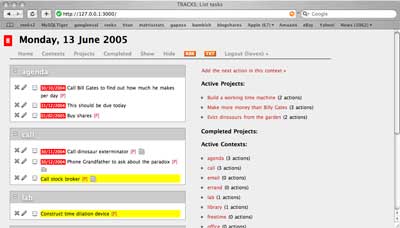
Also, don’t try to follow the suggestions
of my Tracks
post
. It certainly is not enough to get tracks running under Tiger
(and probably also not under Panther as at the time I did a strange mix
of following this path and doing some manual installs using the Hivelogic
page
. This time, I got strange errors coming from the Ruby-MySQL
dialogue. I’m not going to try installing MySQL, PHP and Tracks before
someone like Marc
Lyanage
tells that it is safe to use the Panther-packages under
Tiger!

So, for the moment I’m just going to use my minimal
system (Tiger+Xcode Tools+TeX (following the instructions from this page
)+some excellent free and shareware like DevonThink , Pod2Go
, VoodooPad , SubEthaEdit ,
QuickSilver , Transmit and NetNewsWire ) until the
experts have tamed Tiger. Meanwhile, I’ll just confine myself to the
_Dashboard-Kintergarten_ !

Written by lievenlb

May 9th, 2005 at 8:20 am

Posted in web

Tagged with , , ,

tiger days 1

without comments

It
should be really day 2 but yesterday evening I was a bit overoptimistic
and tried to get MySQL, Ruby, Rails & Tracks installed and in the
process totally wrecked my Ruby-system (and probably a few things more).
Besides, I found out that the _Carbon Copy Cloner_ work-around
doesn\’t really work (that is, one canNOT boot from the cloned copy)
etc. etc. In short, a lot of frustration. So today, I started all over
again (using the install notes below to guide me and so I could reduce
the total time to about 2 hrs). But, as this was the easy bit (still to
come : MySQL, PHP, WordPress+LatexRender, Ruby&Tracks etc.) and I
don\’t want to redo everything again when I do something horribly wrong
I changed my overall tactics. I\’ll keep identical copies on my iBook
and on my iMac and do the next batch of installs on just one machine and
check whether everything works before syncing it to the other. If
something gets messed up I resync to the state of the previous day. Just
one question left : what program to use for the backup/restore now that
CCC seems to be broken? Fortunately, there is still PsyncX which still
seems to work fine (at least today…). Below, for what it is worth,
yesterday\’s log of events :

Okay, I checked that I can still
TeX papers and connect to the printer on the iMac (after Archive/Install
to Tiger). Most other things have broken down, such as my mind on tracks
and my MySQL-database, but I\’m quite hopeful I can rebuild them all.
So, time for a drastic _Erase/Install_ on my iBook.

12:04 : One final safety check. Connect the external
HD, select the _Carbon Copy Cloned_ partition as StartUp Disk and
do a Restart to verify that it can be cloned back should everything go
terribly wrong. Seems to work nicely, so change again from StartUp disk,
restart and disconnect the external HD.

12:16
: Printed the macdevcenter install
tips
and made a fresh pot of coffee. Took the unread part of the
newspaper with me, connected Jan\’s iPod, made it the new StartUp disk
and did another Restart.

12:24 : Selected
\’English\’ as the main language. Selected _DiskUtility_ from the
_Utilities_ menu (before you have to select a Disk destination).
Selected the HD, clicked _Erase_ and choose _Erase Free
Space_ first, then choose the SecurityOption to \’zero out data\’.
(Both steps require a lot of extra time but what is the point of doing
an Erase if you don\’t erase properly? Btw. the macdev-article does not
agree with me on this point.) Meanwhile, had some coffee and a
read…

13:23 : Did quit DiskUtility
which brought me back to the Installer. Selected the HD and clicked on
_Options_ to select Erase&Install and clicked Continue. Then
clicked on _Custom Install_ to choose which Packages to Install.
Did choose _all_ Printer Drivers but in _Language
Translations_ only selected : French, German and Dutch. Didn\’t
select X11! Clicked : _Install_ and had yet another cup of
coffee…

13:45 : Restarted! Got me into
the SetupAssistant. Didn\’t choose to transfer info from another Mac. It
selected our wireless network immediately, and asked me for my .Mac
account info. Did create my main account and finished at
13:53 Only had to stop iTunes from wanting to put
PodSoftware onto the connected iPod… Checked for SoftwareUpdate
but there was none. Am connected to internet but had to add my other
mail-account. Done and received email at 14:05 Found
our Printer but did gray out two-sided printing (have to remember later
how I did set this up…).

14:12 : Time
to add the _Xcode Tools_ : opened the folder on the iPod and
clicked on _XcodeTools.mpkg_ . Followed he default installation.
Finished and deconnected the iPod at 14:24 Took a break
to decide how to continue. (21.97Gb available) Update today : do a
custom install using also cross-development!

14:37 : Okay, first things first : get myself a
working TeX-system starting from this page
to get the latest version of TeXShop and the i-Installer and place both
in the Applications folder and in the Dock. Placed the _To Your
Library_ folder of TeXShop in my ~/Library (containing the texmf
etc. path for pdfsync). Then followed this
page
and the i-Installer to install the packages in the right order
:

  • FreeType 2
  • libwmf
  • Ghostscript
    8
  • ImageMagick
  • FontForge
  • TeX (did a
    Full install with 2005 Devel.)

Had a brief look
through the other packages and maybe I\’ll install _Latex to RTF_
and _RTF 2 Latex_ later. Created a _DMG_ folder and put
the downloaded disk images into it. Created a_PAPERS_ folder and
transferred the last version of the paper with Stijn to check TeX but
clearly it couldn\’t find the _diagrams.sty_ file (I know I have
to quit using this, but I\’ll better get it over for backward
compatibility; put it into ~/Library/texmf/tex/latex/. Ran TeX again
without problems this time and checked the nice source-PDF syncing
(apple-click to jump). Finished : 15:37

15:56 : As long as administration sends me
_Word_ documents and expects me to read them, I have no choice
but to install _Office X_ . The upshot was that while searching
for the OfficeCD I found also the HP LaserJet 1320 CD and installed the
driver so now I can print 2-sided (using Printer Setup Utility) . Done :
16:15

16:45 : Used the
_.mac System Preference_ to get syncing started with my iDisk to
get adresses, calendars and passwords etc. on my iBook. Also filled in
the Sharing Preferences. Now that I have the passwords at hand, it is
time to get the latest versions of some of the shareware I own (and copy
their disk image to the DMG folder)

  • DevonThink
  • href="http://www.devon-technologies.com/products/devonagent/overview.php">DenonAgent
  • Pod2Go : the site seems to be down at the
    moment but fortunately, I have a disk image of it which will have to do
    for now (note to self : check later whether the site is permanently
    dead…) Update today : it is up and running again…

and while I\’m at it I may as well get my wallet out and
purchase the full version of _Lite_ versions I like and use a lot
:

Fortunately, there is also a lot of excellent freeware that I
want to use

One of the following days : MySQL, PHP and perhaps Tracks but
first I desperately need to do some maths to kick off from all this
nonsense…

Written by lievenlb

May 8th, 2005 at 9:24 am

Posted in web

Tagged with , , , , , ,

tiger balm

without comments

I still
havent received my Tiger-package but got a bit panicky because it is
released as a DVD and at least one of our recent iMacs (the older ones
do not even have build in firewire, let alone enough RAM) cannot read
DVDs. That’s not a major problem as one can always send the DVD back and
ask for CDs instead (and wait even longer) or you can follow this trick (using
Firewire target disk mode). Jan suggested another
approach : make the DVD into a _dmg image_, connect an iPod,
erase with DiskUtility its hard disk and use the _Restore_ option
of DiskUtility to copy the dmg onto it. Then choose the iPod as StartUp
Disk and restart and everything works nicely.

As he went through the
trouble of setting up his iPod, I merely borrowed it and did an
Archive/Install of Tiger on the redundant iMac.All went well and
afterwards you can hardly see the difference with Panther except in the
top right corner where there is the _SpotLight_ icon (a feature I
do like and will use often) and in the lower left corner the
_Dashboard_ icon (a feature which still has to convince me).

Anyway, I wanted to check out as quickly as possible a comment (also
from jan)
that there is a new _Tiger only_ version of TexShop out
which syncs nicely between the PDF-file and the source. As it requires
some extra packages using i-Installer I took the opportunity
to update my TeX-system.

As they predict bad weather for the
rest of the weekend I thought “well, why not just begin the
Panther/Tiger switch on my _iBook_ using the iPod trick as well”.
But first I wanted to backup the latest Tiger+TeX version using
_Carbon Copy Cloner_. Over the last year this has become such a
routine operation (backing up to a slick _Porsche_ designed 250Gb
HD) that I was quite surprised that the computer halted after typing in
the super-user password. Forcing CCC to quit and restarting didn’t solve
the problem so it was time to do a Google on “Carbon Copy Cloner Tiger”
to find out that other (quicker) people had already experienced the
same.

As making a bootable backup is crucial for me I had to
find a way round this and fortunately found the Tiger balm
post. Here’s the hack :

- go to the Applications folder
-
open Terminal and type sudo open
– drag CCC to
the Terminal-window
– type return and provide superuser
password
– open CCC and fill in Source and Target disks as
usual
– it works!

Rumours are that
Mike Bombich will rewrite CCC shortly to fix this problem. Let’s just
hope that I don’t find too many other applications behaving unexpectedly
(in the 2 hours I’m onto Tiger I also found _Remote Desktop_ not
to work at all but then it’s an old 1.2 version so maybe Apple took this
chance to force people to upgrade (and pay heavily) as they seem to do
with hardware (someone should come up with a way to get the first
generation iMacs onto Tiger!)

Written by lievenlb

May 6th, 2005 at 8:32 pm

Posted in web

Tagged with , , ,

nostalgia

without comments

Unlike the
cooler people out there, I haven’t received my
_pre-ordered_ copy (via AppleStore) of Tiger yet. Partly my own fault
because I couldn’t resist the temptation to bundle up with a
personalized iPod Photo!
The good news is that it buys me more time to follow the
housecleaning tips
. First, my idea was to make a CarbonCopyClooner-
image of my iBook and put it on the _iMac_ upstairs which I
rarely use these days, do a clean
Tiger install
on the iBook and gradually copy over the essential
programs and files I need (and only those!). But reading the
macdev-article, I think it is better to keep my iBook running Panther
and experiment with Tiger on the redundant iMac. (Btw. unless you want
to have a copy of my Mac-installation there will be hardly a point
checking this blog the next couple of weeks as I intend to write down
all details of the Panther/Tiger switch here.)

Last week-end I
started a _Paper-rescue_ operation, that is, to find among the
multiple copies of books/papers/courses, the ones that contain all the
required material to re-TeX them and unfortunately my _archive_
is in a bad state. There is hardly a source-file left of a paper prior
to 1999 when I started putting all my papers on the arXiv.

On the other hand, I do
have saved most of my undergraduate courses. Most of them were still
using postscript-crap like _epsfig_ etc. so I had to convert all
the graphics to PDFs (merely using Preview ) and
modify the epsfig-command to _includegraphics_. So far, I
converted all my undergraduate _differential geometry_ courses
from 1998 to this year and made them available in a uniform
screen-friendly viewing format at TheLibrary/undergraduate.

There are two
ways to read the changes in these courses over the years. (1) as a shift
from _differential_ geometry to more _algebraic_ geometry
and (2) as a shift towards realism wrt.the level of our undegraduate
students. In 1998 I was still thinking
that I could teach them an easy way into Connes non-commutative standard
model but didn’t go further than the Lie group sections (maybe one day
I’ll rewrite this course as a graduate course when I ever get
reinterested in the Connes’ approach). In 1999 I had the illusion that
it might be a good idea to introduce manifolds-by-examples coming from
operads! In 2000 I gave in to the fact
that most of the students which had to follow this course were applied
mathematicians so perhaps it was a good idea to introduce them to
dynamical systems (quod non!). The 2001 course is probably the
most realistic one while still doing standard differential geometry. In
2002 I used the conifold
singularity and conifold transitions (deformations and blow-ups) as
motivation but it was clear that the students did have difficulties with
the blow-up part as they didn’t have enough experience in
_algebraic_ geometry. So the last two years I’m giving an
introduction to algebraic geometry culminating in blow-ups and some
non-commutative geometry.

Written by lievenlb

May 4th, 2005 at 8:29 pm

GMD

without comments

I’m always
extremely slow to pick up a trend (let alone a hype), in mathematics as
well as in real life. It took me over a year to know of the existence of
_blogs_ and to realize that they were a much easier way to
maintain a webpage than manually modifying HTML-pages. But, eventually I
sometimes get there, usually with the help of the mac-dev-center. So, once again,
I read their gettings things done with your mac article long after it was
posted and completely unaware of the Getting Things Done (or GTD) hype.

At first, it just
sounds as one of those boring managament-nonsense-peptalk things (and
probably that is precisely what it generically is). Or what do you think
about the following resume from Getting
started with ‘Getting things done’
:

  1. identify all the
    stuff in your life that isnÕt in the right place (close all open
    loops)
  2. get rid of the stuff that isnÕt yours or you donÕt
    need right now
  3. create a right place that you trust and that
    supports your working style and values
  4. put your stuff in the
    right place, consistently
  5. do your stuff in a way that honors
    your time, your energy, and the context of any given moment
  6. iterate and refactor mercilessly

But in fact there is
also some interesting material around at the 43 folders website which bring this
management-talk closer to home such as the How does a
nerd hack GTD?
post.

Also of interest are his findings after
a year working with the GTD setup. These are contained in three posts :
A Year
of Getting Things Done: Part 1, The Good Stuff
, followed by A Year of
Getting Things Done: Part 2, The Stuff I Wish I Were Better At
to
end with A Year of
Getting Things Done: Part 3, The Future of GTD?
. If these three
postings don’t get you intrigued, nothing else will.

So, is
there something like _GMD : Getting Mathematics Done_? Clearly, I
don’t mean getting theorems proved, that’s a thing of a few seconds of
inspiration and months to fill in the gaps. But, perhaps all this GTD
and the software mentioned can be of some help to manage the
everyday-workflow of mathematicians, such as checking the arXiv and the
web, maintaining an email-, pdf- and BiBTeX-database, drafting papers,
books and courses etc.

In the next few weeks I’ll try out some
of the tricks. Probably another way to state this is the question “which
Apps will survive Tiger?” Now that it is official that Tiger (that is, Mac
10.4 to non-apple eaters) will be released by the end of the month it is
time to rethink which of the tools I really like to keep and which is
just useless garbage I picked up along the road. For example, around
this time last year I had a Perl
phase
and bought half a meter or so of O’Reilly Perl-books. And yes
I did write a few simple scripts, some useful such as my own arXiv RSS-feeds,
some not so useful as a web-spider I wrote to check on changes in the
list of hamepages of people working in non-commutative algebra and
geometry. A year later I realize I’ll never become a Perl Monk. So from now on I want to
make my computer-life as useful and easy as possible, relying on wizards
to provide me with cool software to use and help me enjoy mathematics
even more. I’ll keep you posted how my GMD-adventure goes.

Written by lievenlb

April 14th, 2005 at 8:08 pm

Posted in web

Tagged with , , , , , , ,